Features
One register, and everything that orbits around it.
Twenty attributes per asset, a QR code on every object, a history that cannot be erased, and reports that write themselves. Here is the detail.
Features
Everything an inventory needs, nothing more.
One register for the whole inventory
Twenty attributes per asset: brand, model, serial number, supplier, condition, purchase price, warranty, location. The asset ID is generated on creation.
QR codes and labels
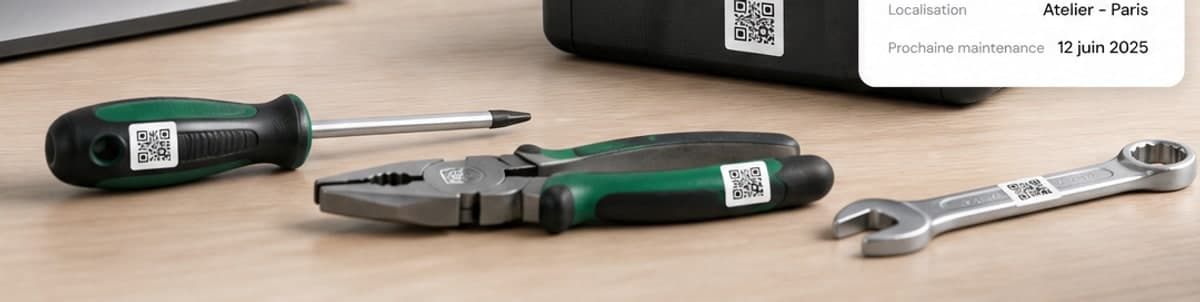
A QR code is generated for every asset. Print 6 × 3 cm labels one at a time or in batches, and scan them from a phone to open the record.
Maintenance and work orders
Report a fault, schedule recurring interventions, track the cost and duration of every repair. Automatic alerts before the due date.
Reports and inventories
Average age of the inventory, value after depreciation, availability rate, maintenance costs. A full inventory at any given date, quarterly or annual reports.
Multi-site and multi-tenant
Each organisation has its own isolated data space. A site manager sees only their site; the organisation admin transfers assets between sites.
Import and export
Bring your existing inventory in from an Excel file in a single operation, and take any filtered list back out as PDF or Excel.
Roles and assignments
Organisation admin, site manager, technician, standard user. Assign an asset to a person or a project, and record a loan with a return date.
A complete history
Every movement is dated and signed: assignment, transfer, return, repair, attribute change. The Business audit log keeps the IP address and the action.
Account security
Hashed passwords, rate-limited sign-in attempts, single-use reset links valid for one hour. Each organisation's data is isolated inside the database itself, not only in the application.
Works offline
A local instance you can install on your own server: the inventory stays readable without internet, and syncs automatically when the connection returns.
Maintenance does not get forgotten
Every preventive plan opens its work order on the due date and goes out by email, each morning. Warranty end dates and loan return dates are recorded on the asset record.
From the phone to the workshop
The technician scans a QR code on their phone and updates the record on the spot; the director reads the report at their desk. The application interface is in French — an English interface is planned, and we are not giving a date we cannot hold.
The product
An interface that gets straight to the point.
No decorative dashboard: three screens are enough to run an inventory of a thousand assets.
The whole inventory on one screen
Inventory value after depreciation, assets under maintenance, warranties coming to an end, monthly cost of interventions. Alerts surface on their own.
- Figures recalculated on every movement
- Warranty and overdue maintenance alerts
- Inventory split by category and by site
Tableau de bord
Parc total
981
+34 ce mois
Valeur du parc
248 M
FCFA · après dépréciation
En maintenance
17
4 tickets en retard
Garanties < 30 j
9
À renouveler
Coût des maintenances
8 derniers mois · kFCFA
Répartition par catégorie
Alertes du jour
Groupe électrogène GE-2024-00118 — maintenance préventive dépassée de 6 jours
Garantie du serveur Dell R450 (EQ-2023-00072) expire dans 11 jours
Inventaire du site de Bonabéri clôturé — 214 équipements vérifiés
The asset record
Twenty fields, only four of them required.
Start with the bare minimum: a name, a category, a location. The asset ID and the QR code are generated automatically. The rest fills in at your own pace.
Labels & QR codes
The QR stuck on the machine opens its record.
This is the gesture that changes everything: no more hunting for a serial number engraved under a chassis. You scan, you know.
Automatic asset ID
Generated on creation, in the format you choose: EQ-2025-00042, ITM-000245, or your own numbering.
Batch printing
Select 200 assets, print the A4 sheet on adhesive paper. Office printer or thermal label printer.
Scanning from a phone
The technician scans the label on site: the record opens, and they report a fault or change the status in two taps.
The physical ↔ digital link
Every object in the inventory carries its identity. No more duplicates, no more ghost assets in the spreadsheet.
A4 sheet
6 × 3 CM · ×21
Dell Latitude 5540
DOUALA · HEAD OFFICE
EQ-2025-00042
Stanley toolbox
BONABÉRI · WORKSHOP
ITM-000245
Print preview
Roles and privileges
Everyone sees what they need to see.
Organisation admin
The whole organisation
Creates accounts, manages sites, transfers assets between sites, and has access to billing and the audit log.
Site manager
One operating site
Runs their site's inventory, assigns equipment, opens and closes work orders, and produces the site's reports.
Technician
Interventions
Scans, reads records, reports faults, enters intervention costs and durations, and changes statuses.
Standard user
Read-only
Reads the inventory they are allowed to see, finds an asset, and checks their own assignments and return dates.
Security & sovereignty
Built for imperfect networks.
A cut fibre must not stop a workshop. ItemScale works online, offline, and on your own server if your organisation requires it.
Synchronisation — local instance
12:04:11 OK network restored — queue: 34 operations
12:04:13 OK 34/34 pushed to the server
12:04:15 OK conflicts resolved — 0 pending
12:04:15 local and remote inventories identical
Account access
Ten sign-in attempts per account per quarter hour, not one more. Reset links work once and expire after an hour. A timestamped sign-in history is available on the Business plan.
An instance on your server
The Business plan installs on your premises. The inventory stays readable without internet and syncs when the network returns.
Your data stays yours
Full Excel export at any time, and PDF printing of your inventories and labels. On termination, a complete extract before anything is deleted.
Isolated down to the database
Each organisation's data is separated inside the database itself, not only in the application. A query that forgot its filter returns nothing rather than someone else's inventory.
PostgreSQL · Cloudflare · Encryption at rest
Your first inventory starts now.
Create your account, add twenty assets, print your labels. Free, no commitment, no card.